Visual Schema Compare for SDK Style SQL Database Projects in Visual Studio and SSMS
Keeping your SQL database project in sync with a live database is one of the most common — and most tedious — challenges in database development. If you have ever manually compared CREATE TABLE scripts line by line, or tried to figure out which stored procedures drifted out of sync between your source code and development or production environments, Visual Schema Compare was built for you.
What is Visual Schema Compare?
Visual Schema Compare is a built-in feature of the SQL Database Project Power Tools Visual Studio extension and the SQL Database Project Power Tools for SSMS extension. It surfaces the full power of the Microsoft DacFx schema comparison engine — the same engine used by SQL Server Data Tools — directly inside SSMS and Visual Studio, in a purpose-built tool window.
With a single right-click on your database project, you can:
- Compare your project against a live database to see what has drifted
- Compare a live database against your project to see what your project is missing
- Review per-object T-SQL diffs side by side
- Copy the generated deployment script ready for review or execution
No extra tooling, no manual diffing, and no leaving Visual Studio / SSMS.
Why You Need This
The Problem: Schema Drift
Even with a database project in source control, schemas drift. A hotfix goes directly to production, a developer makes a change in their local environment but forgets to commit the SQL script, or an ORM migration runs against a shared database. Over time, the gap between what is in the project and what is in the database grows — and at some point you need to reconcile them.
Traditional approaches involve:
- Exporting scripts and doing a file diff
- Writing your own comparison queries against
sys.objects
None of these fit naturally into a code-first database development workflow.
The Solution: Visual Schema Compare
Visual Schema Compare gives you a first-class schema diff experience without leaving your development environment.
Key Capabilities
- Project-to-database and database-to-project comparison – Choose which side is the source and which is the target, covering both deployment and reverse-engineering scenarios.
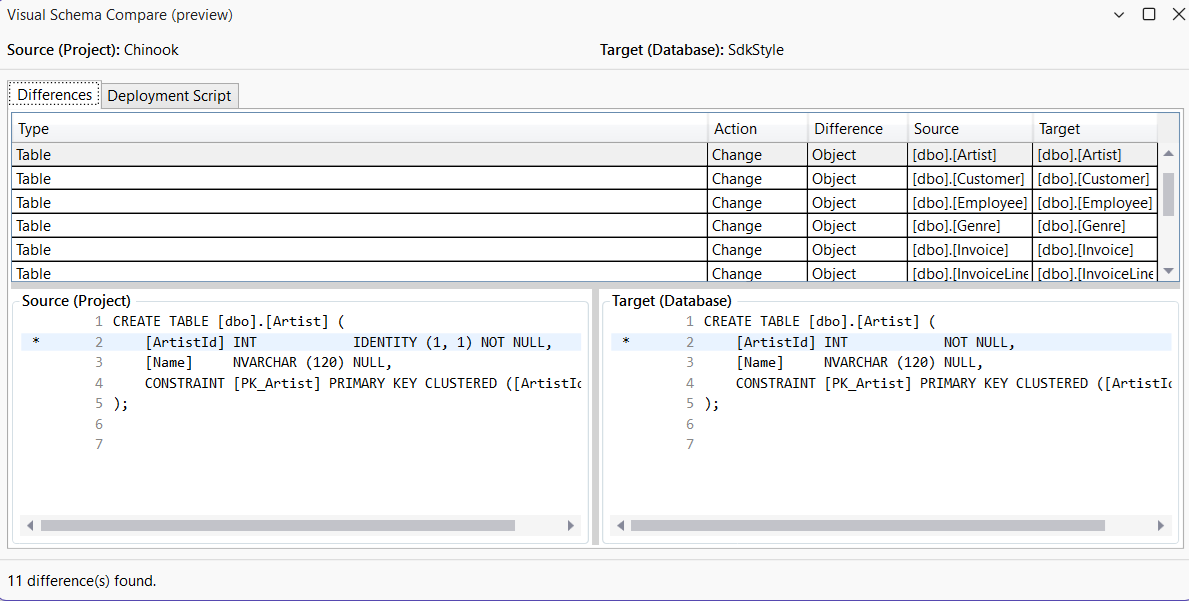
- Side-by-side T-SQL diffs – Selecting any row in the differences grid renders the source and target T-SQL definitions side by side, powered by DiffPlex, so you can immediately see what changed.
- Actionable differences grid – The grid shows the object name, object type, difference type (Added, Deleted, Changed), and the update action DacFx recommends.
- Deployment script generation – DacFx generates a full T-SQL deployment script for the detected differences. You can copy it to the clipboard and use it for manual review, peer review, or execution in your own pipeline.
- Async comparison – The comparison runs asynchronously so Visual Studio stays responsive while DacFx processes large schemas.
Getting Started
Prerequisites
- Visual Studio 2022 (any edition) or SSMS 22
- SQL Database Project Power Tools for Visual Studio installed
- or SQL Database Project Power Tools for SSMS installed
- An SDK-style SQL Database Project in your solution
Running a Comparison
-
In Solution Explorer, right-click your SQL Database Project.
-
Select SQL Project Power Tools > Visual Schema Compare (preview)...
-
In the dialog that appears, enter the connection details for your database and choose the comparison direction:
- Database is source – compares the live database against your project (useful for reverse-engineering changes made directly to the database)
- Project is source – compares your project against the live database (useful before deployment)
-
Click Compare. The Visual Schema Compare tool window opens and populates with the results.
-
Browse the differences. Click any row in the grid to see the side-by-side T-SQL diff for that object.
-
When you are ready to act on the differences, click Copy Deployment Script to copy the DacFx-generated T-SQL deployment script to your clipboard.
Benefits of SQL Database Project Power Tools
Visual Schema Compare is just one of the features in SQL Database Project Power Tools. The extension as a whole is designed to reduce friction in every stage of the database development lifecycle:
| Feature | Benefit |
|---|---|
| Import Database | Bootstrap a new database project from an existing schema in seconds |
| Visual Schema Compare | Keep project and database in sync with a visual diff tool |
| Static Code Analysis | Catch design, naming, and performance issues before deployment |
| Rule Manager | Manage static code analysis rules and get documentation links via an intuitive visual interface |
| E/R Diagrams | Auto-generate Mermaid entity/relationship diagrams from your project |
| Script Table Data | Generate MERGE statements for seed data directly from live tables |
| Scaffold Data API Builder | Generate a Data API Builder configuration file from your project |
| .dacpac Explorer | Browse the contents of a .dacpac file in Solution Explorer |
| Project Templates | Quickly create new SQL database projects from ready-made templates (Visual Studio only) |
Together, these features make SQL database projects a viable choice for teams that want to apply software engineering best practices — source control, code review, CI/CD — to their database schemas while enabling peformant, cross platform build and deployment processes.
Acknowledgements
The Visual Schema Compare feature was inspired by the excellent Database Schema Compare feature in Axial SQL Tools. The concept of surfacing DacFx schema comparison inside a Visual Studio tool window, with a per-object T-SQL diff view and a deployment script tab, originated there. Many thanks to the Axial SQL Tools team for sharing the idea openly.
Installation
Install from the Visual Studio Marketplace or search for SQL Database Project Power Tools in Extensions > Manage Extensions inside Visual Studio 2022.
Feedback, bug reports, and contributions are welcome on the GitHub repository.
If you find the extension useful, please give it a ★★★★★ rating on the Visual Studio Marketplace and consider sponsoring the author on GitHub.