T-SQL Analyzer: From getting started to deep dives - 2 new rules and a try-out web site
It has been six months since I blogged about SqlServer.Rules 5.0.0. Most of the work since then has been the less visible kind: fixing false positives that users reported, and bringing live analysis to VS Code.
This post is about the latest additions, and I have tried to put something in it for both ends of the scale:
- If you have never tried the rules, there is now a web site where you can paste a script and see what they have to say about it.
- If you already run the rules in your builds, there are two new rules, and better options for configuring naming standards and checks for sensitive data.
If you are new here: T-SQL Analyzer is my collection of more than 140 open source static code analysis rules for T-SQL, built on the DacFx API. The same rules run live in Visual Studio, SSMS and VS Code, during the build of a SQL Database project, and from the command line.
Getting started: try it in your browser
Until now, the first step to see what the rules do was to install something. An extension, a NuGet package or a .NET tool - none of them hard to install, but still a step you had to take before you knew if it was worth it.
So I made a small demo web app:
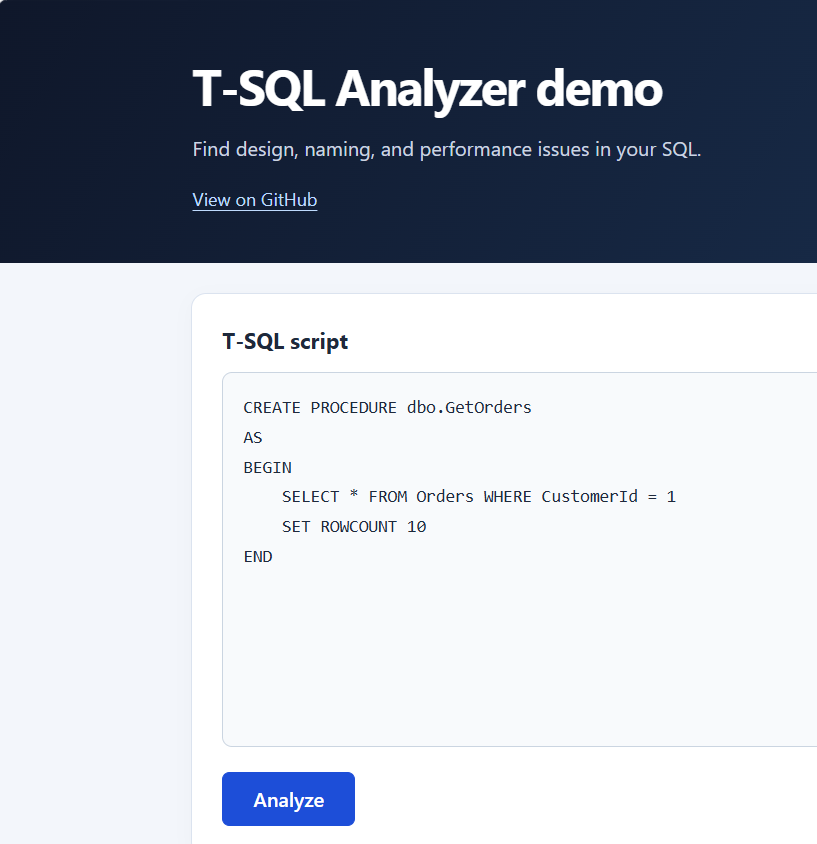
Paste a T-SQL script, press Analyze, and you get a list of findings with rule id, line, column and a description. Each rule id links to the documentation page for that rule, with an explanation and an example.
Your script is parsed and analyzed, nothing else. It is never executed, there is no database behind the site, and nothing is stored.
As an example, I pasted this table definition:
CREATE TABLE dbo.Customer
(
    CustomerId INT IDENTITY(1, 1) CONSTRAINT PK_Customer PRIMARY KEY,
    Name NVARCHAR(100) NOT NULL,
    Email NVARCHAR(200),
    DateOfBirth DATE NULL
);
GO
ADD SENSITIVITY CLASSIFICATION TO dbo.Customer.DateOfBirth
    WITH (LABEL = 'Confidential', INFORMATION_TYPE = 'Date Of Birth');
And got this back:
| Rule | Line | Col | Description |
|---|---|---|---|
| SRD0001 | 1 | 1 | A unique constraint can enforce the table's natural key and prevent duplicate entities. |
| SRD0098 | 5 | 5 | Specify NULL or NOT NULL explicitly for table columns. |
| SRD0097 | 6 | 5 | Classified sensitive columns should be masked or encrypted. |
The last two are the new rules, more about them below.
How it is put together
The app is a single HTML page and one ASP.NET Core minimal API endpoint on .NET 10. It uses the same analyzer library as the command line tool and the editor extensions, so what you see on the site is what you get in your editor. The script is analyzed with all rules enabled, against the Sql170 version.
It runs as a Linux container on Azure Container Apps, on the consumption plan with scale to zero. That keeps my bill low, but it also means that the first request after a quiet period is slow, so give it some seconds.
To keep it running for everybody, I have added a few limits: scripts can be up to 8 KB, you get 10 requests per minute, and an analysis is stopped after 30 seconds. For anything larger, install one of the tools - the readme has a table that takes you from where you work to the right install link.
The source is in the tools/SqlAnalyzerWeb folder, including a Dockerfile and notes on how to host it yourself. One detail that may save you some time if you want to run DacFx in a Linux container: it needs ICU, so use the Debian based ASP.NET Core image and leave InvariantGlobalization off. Alpine and the chiseled images fail with a CultureNotFoundException.
Two new rules
SRD0098: Explicit column nullability
This rule comes out of an issue I created to go through the SQL Code Smells material from the late Phil Factor, looking for smells that my rules did not cover yet. Columns created without NULL or NOT NULL was one that was both missing and possible to detect from the script alone.
CREATE TABLE dbo.Example
(
    Explicit INT NOT NULL,
    Unspecified INT
);
Unspecified is reported, Explicit is not.
Why care? When you leave it out, the nullability of the column depends on the ANSI_NULL_DFLT settings in effect when the table is created. The same script can give you two different tables, and you do not find out until an insert fails, or until a NULL shows up where you did not expect one.
The rule stays quiet where nullability is not really up to you: computed columns, identity columns, sparse columns and primary key columns are not reported.
Docs: SRD0098
SRD0097: Protect sensitive columns
The idea for this rule comes from a DacFx feature request, microsoft/DacFx#880, asking for a BlockOnUnprotectedSensitiveColumns option in SqlPackage - the data protection counterpart of BlockOnPossibleDataLoss. That is a deployment feature and not something I can add, but a good part of the check can be done much earlier, when you build the project.
The rule reports columns that have a sensitivity classification, but are neither masked with dynamic data masking nor encrypted with Always Encrypted:
CREATE TABLE dbo.Customer
(
    CustomerId INT NOT NULL CONSTRAINT PK_Customer PRIMARY KEY,
    DateOfBirth DATE NULL,
    Email NVARCHAR(200) MASKED WITH (FUNCTION = 'email()') NULL
);
GO
ADD SENSITIVITY CLASSIFICATION TO dbo.Customer.DateOfBirth
    WITH (LABEL = 'Confidential', INFORMATION_TYPE = 'Date Of Birth');
GO
ADD SENSITIVITY CLASSIFICATION TO dbo.Customer.Email
    WITH (LABEL = 'Confidential', INFORMATION_TYPE = 'Contact Info');
DateOfBirth is reported until you mask or encrypt it. Email is fine, as it is masked.
Columns classified with the Public label, or with an explicit RANK = NONE, are not reported.
A word of caution: this rule is a guardrail, it does not prove that you are compliant with anything. Dynamic data masking counts as protection here, but it only masks query results. The data is still stored unencrypted, and it is not protected in exports, replicas or other copies of the database.
Docs: SRD0097
Deep dive: configure rules with .editorconfig
Most rules have nothing to configure, you turn them on or off. A few need to know something about your conventions, and for those I use .editorconfig, in a [*.sql] section.
Find sensitive columns that nobody classified
SRD0097 has an obvious weakness: it only looks at columns that somebody has classified. A SocialSecurityNumber column that nobody got around to classifying passes without a word.
To cover that, you can point the rule to an Information Protection policy file. This is the JSON format (version 2.0) that SSMS uses for Data Discovery & Classification, with name patterns for each information type. You can export one from SSMS or start from this sample.
[*.sql]
sqlserver_rules.srd0097.policy_file = config/sensitivity-policy.json
sqlserver_rules.srd0097.exceptions_file = config/sensitivity-exceptions.json
Relative paths are resolved from the folder of the .editorconfig file. With a policy in place, columns that match a pattern are reported with a message like this:
Column 'Email' is potentially sensitive (policy information type 'Contact Info', pattern '%email%') but is not masked or Always Encrypted.
This is opt-in. If you do not select a policy file, the rule behaves as described above.
The patterns work like SQL LIKE, and they match more than you think. %dob% finds your DOB column, but it also finds SavedObjectID. You can tighten the patterns in the policy file, or you can list the columns you have looked at in the exceptions file:
{
  "exceptions": [
    {
      "column": "[dbo].[Address].[AddressId]",
      "reason": "Surrogate key, not personal data",
      "approvedBy": "Data governance team",
      "expires": "2027-12-31"
    }
  ]
}
The column name must be exact and a reason is required. approvedBy and expires are optional. I like the expiry date, it forces somebody to look at the exception again. Exceptions only apply to findings from the policy, you can not use them to hide a column that has an actual classification.
If you want unprotected columns to break the build, promote the rule to an error in your project file:
<SqlCodeAnalysisRules>+!SqlServer.Rules.SRD0097</SqlCodeAnalysisRules>
Your naming standard, not mine
SRN0007 checks the names of primary keys, foreign keys, indexes, check constraints and default constraints. Out of the box it expects names like PK_Customer and DF_Customer_Created. That is one convention out of many, and "your rule does not match our naming standard" has been a fair complaint.
The patterns are regular expressions, and you can replace each of them. These are the defaults:
[*.sql]
sqlserver_rules.srn0007.pk_regex = ^PK_{{tableName}}$
sqlserver_rules.srn0007.fk_regex = ^FK_{{tableName}}_{{foreignTableName}}.*
sqlserver_rules.srn0007.ix_regex = ^IX_{{tableName}}_.*
sqlserver_rules.srn0007.ux_regex = ^UX_{{tableName}}_.*
sqlserver_rules.srn0007.ck_regex = ^CK_{{tableName}}_.*
sqlserver_rules.srn0007.df_regex = ^DF_{{tableName}}_{{columnName}}$
The tokens you can use are {{tableName}}, {{schemaName}}, {{foreignTableName}}, {{foreignSchemaName}} and {{columnName}}. They are replaced with the actual names before the name is matched, and the match ignores case.
Say your standard is to include the schema name in primary key names:
[*.sql]
sqlserver_rules.srn0007.pk_regex = ^PK_{{schemaName}}_{{tableName}}$
Then this table:
CREATE TABLE dbo.Customer
(
    CustomerId INT IDENTITY(1, 1) NOT NULL,
    Name NVARCHAR(100) NOT NULL,
    Created DATETIME2 NOT NULL CONSTRAINT DF_Customer_Created DEFAULT (SYSUTCDATETIME()),
    CONSTRAINT PK_Customer PRIMARY KEY CLUSTERED (CustomerId)
);
gives you:
Customer.sql(6,5,6,5): SqlServer.Rules.SRN0007 : Primary Key 'PK_Customer' does not follow the company naming standard. Please match regex ^PK_dbo_Customer$.
The message shows the pattern after the tokens have been replaced, so you can see exactly what the name is compared with. The default constraint is not reported, as it still matches the default pattern.
Which .editorconfig is used?
By default, the rules look for .editorconfig starting from the folder of each .sql file, the same way your editor does. That works well for SQL projects and loose scripts.
It does not work when there is no file on disk to start from: a .dacpac, a live database, a .zip file or text passed directly to the tool. For those, you can now tell the command line tool which file to use:
tsqlanalyze -i C:\scripts\database.dacpac --editorconfig C:\config\.editorconfig
The Visual Studio and SSMS extensions have a matching EditorConfig path setting in Tools/Options.
When you select a file this way, only its [*.sql] sections are used, and it is not combined with any .editorconfig files found next to your scripts. A value of unset brings a setting back to its default.
How to get it
The new rules are in version 5.1.12 of the rules package. For SQL Database projects, update the package reference:
<PackageReference Include="ErikEJ.DacFX.SqlServer.Rules" Version="5.1.12">
  <PrivateAssets>all</PrivateAssets>
</PackageReference>
Update the command line tool with:
dotnet tool update --global ErikEJ.DacFX.TSQLAnalyzer.Cli
The links to the extensions for Visual Studio, SSMS and VS Code are in the readme, and all rules are listed with explanations and examples in the rule catalogue.
The release notes also list a good number of false positive fixes, for example for EXISTS against CTEs (SRP0024), UPDATE with a JOIN (SRD0018) and COUNT comparisons (SRP0023). A special thank you to @chrstphe and @marcocarzaniga-it for their first contributions to the project.
Feedback
If a rule complains about something it should not, or stays quiet when it should not, please open an issue. A short script that reproduces the problem is the best help I can get - and now you can check it on the demo site first.
If you find the rules useful, you can also sponsor me on GitHub.