Fixing SQL Server 2025 LocalDB in Visual Studio 2026: Enabling REGEXP and VECTOR Support
If you're a developer using SQL Server LocalDB with Visual Studio 2026 and you've tried to use the exciting new REGEXP_* functions or the VECTOR data type, you may have encountered a frustrating crash. Here's what's happening and how to fix it.
The Problem
SQL Server 2025 introduced powerful new features including:
- REGEXP functions (
REGEXP_LIKE,REGEXP_REPLACE,REGEXP_SUBSTR, etc.) - VECTOR data type for AI/ML vector embeddings
However, the initial LocalDB installer shipped with missing DLLs (RegExpr.dll and vectorffi.dll), causing sqlservr.exe to crash when these features are used.
Symptoms
When you execute a query like:
SELECT REGEXP_REPLACE('the cat sat on the mat', 'cat', 'dog')
You'll see an error like:
Named Pipes Provider: The pipe has been ended.
Communication link failure
And in your LocalDB error log (%USERPROFILE%\AppData\Local\Microsoft\Microsoft SQL Server Local DB\Instances\MSSQLLocalDb\error.log):
Exception Code = c06d007e EXCEPTION_MOD_NOT_FOUND
Delay load failure occurred for module 'RegExpr.dll'
The Solution
Microsoft fixed this issue in Cumulative Update 3 (CU3) for SQL Server 2025. The fix includes an updated SQLLOCALDB.MSI with the missing DLLs.
Step-by-Step Instructions
1. Download CU3
Download the SQL Server 2025 Cumulative Update 3 from Microsoft:
👉 SQL Server 2025 CU3 Download
The installer is approximately 400 MB.
2. Run the CU3 Installer
Run the downloaded installer. It will extract files to a temporary directory on one of your drives (e.g., C:\<GUID>\...).
⚠️ Important: Don't close the installer yet! The temp folder will be deleted when the installer exits.
3. Locate the Updated LocalDB MSI
Navigate to the extracted folder and find the LocalDB installer:
C:\<GUID>\1033_ENU_LP\x64\Setup\x64\SQLLOCALDB.MSI
The <GUID> will be a unique identifier like {A1B2C3D4-E5F6-...}.
💡 Tip: Copy
SQLLOCALDB.MSI(~65 MB) to a permanent location before proceeding. This allows you to share it with teammates or reinstall later.
4. Install the Updated LocalDB
Open PowerShell as Administrator and run:
msiexec /i "C:\<GUID>\1033_ENU_LP\x64\Setup\x64\SQLLOCALDB.MSI"
Or if you copied it:
msiexec /i "C:\Tools\SQLLOCALDB.MSI"
5. Recreate Your LocalDB Instance (optional)
The updated binaries are installed, but your existing instance may need to be recreated to use them.
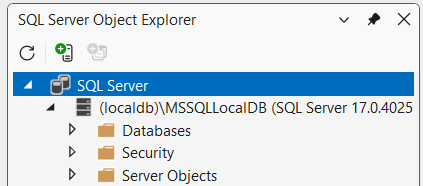
First check the active version after stopping all Visual Studio instances:
SqlLocalDB info MSSQLLocalDB
If the version number is below 17.0.4025, recreate the instance:
# Stop the instance
SqlLocalDB stop MSSQLLocalDB

# Delete the instance (your databases are preserved!)
SqlLocalDB delete MSSQLLocalDB

# Create a new instance with the updated version
SqlLocalDB create MSSQLLocalDB

# Start the instance
SqlLocalDB start MSSQLLocalDB
📁 Note: Deleting an instance does not delete your databases. They remain in this folder
%USERPROFILE%\AppData\Local\Microsoft\Microsoft SQL Server Local DB\Instances\and can be attached later.
6. Verify the Fix
Connect to your LocalDB instance and test the new features:
-- Test REGEXP functions
SELECT REGEXP_REPLACE('Hello World', 'World', 'Visual Studio');
-- Returns: Hello Visual Studio

-- Test VECTOR type
CREATE TABLE #VectorTest (
    Id INT PRIMARY KEY,
    Embedding VECTOR(3)
);

INSERT INTO #VectorTest VALUES (1, '[0.1, 0.2, 0.3]');
SELECT * FROM #VectorTest;

DROP TABLE #VectorTest;
For Team Leads: Sharing the Fix
If you have a development team, you can:
- Copy the
SQLLOCALDB.MSIto a shared network location - Create a simple script for your team:
# update-localdb.ps1
param(
    [string]$MsiPath = "\\server\share\SQLLOCALDB.MSI"
)

Write-Host "Installing updated LocalDB..." -ForegroundColor Cyan
msiexec /i $MsiPath /quiet /norestart

Write-Host "Recreating LocalDB instance..." -ForegroundColor Cyan
SqlLocalDB stop MSSQLLocalDB 2>$null
SqlLocalDB delete MSSQLLocalDB 2>$null
SqlLocalDB create MSSQLLocalDB
SqlLocalDB start MSSQLLocalDB

Write-Host "Done! Testing REGEXP support..." -ForegroundColor Green
sqlcmd -W -S "(localdb)\MSSQLLocalDB" -Q "SELECT REGEXP_REPLACE('Success', 'Success', 'It works!')"
Troubleshooting
"The instance is in use"
If you get an error that the instance is in use:
- Close Visual Studio and any applications using LocalDB
- Close SQL Server Management Studio and/or Azure Data Studio and/or VS Code
- Run:
SqlLocalDB stop MSSQLLocalDB -k(the-kflag kills connections)
Wrong version after update
Verify your version with:
SqlLocalDB info MSSQLLocalDB
You should see version 17.4.4025.3 or higher.
Still crashing?
Ensure you're using the MSI from CU3 or later, not the original RTM installer from Microsoft's download page (which may still be outdated).
References
- Microsoft Q&A: SQL Server 2025 LocalDB missing components
- SQL Server 2025 CU3 Release Notes
- Azure Feedback: LocalDB missing DLLs