The SSMS extension ecosystem is growing up: list, acquire and maintain extensions with ease
When SQL Server Management Studio 21 arrived on the Visual Studio 2022 shell, it opened the door for third-party extensions in SSMS for the first time in years. But an extensibility model alone does not make an ecosystem. You also need answers to three simple questions:
- What extensions exist?
- How do I get them?
- How do I keep them up to date (and remove them again)?
I am happy to say that thanks to great community efforts, all three questions now have good answers. This post is a celebration of the improvements that I and the community have made over the past months — and an invitation for you to join in.
1. Discover: the SSMS Extensions list
The first challenge was simply knowing what is out there. I briefly blogged about this earlier, and the site has grown nicely since:
It is a curated list of extensions and add-ins for SQL Server Management Studio 22, currently listing 45 extensions — 20 of them free and 14 open source. The list covers everything from Object Explorer enhancements and SQL formatters to performance tuning tools and commercial productivity suites.
The source list was adapted from Daniel Brink's SSMS extension catalog — a great example of community collaboration. If you know of an extension that is missing, contributions are very welcome.
2. Acquire: the SSMS Gallery
Knowing an extension exists is one thing — getting hold of it is another. SSMS does not (yet) have an official extension marketplace, so downloads have been scattered across GitHub releases pages, vendor sites and blog posts.
Enter the SSMS Gallery — a free gallery for browsing and downloading free SSMS extensions in one place.
The gallery is based on Mads Kristensen's well-proven Open VSIX Gallery code base, adapted for SQL Server Management Studio. It offers:
- Browse and search all published extensions with rich descriptions, icons and screenshots.
- Direct
.vsixdownloads — no hunting through release pages. - ATOM/RSS feeds for the whole gallery, per author, and per extension — so you can be notified when your favorite extension ships an update.
- A simple HTTP publishing API — publishing is a single
POSTof your.vsixfile, easily automated from GitHub Actions or any other CI system.
Several extensions are already published there, including T-SQL Analyzer, SQL Database Project Power Tools, Performance Studio, SQL 4 CDS, SSMS EnvTabs and the SQL Server Compact/SQLite Toolbox.
An invitation to extension authors
If you build an SSMS extension: please consider publishing it to the SSMS Gallery! It takes one HTTP call (or one GitHub Actions step) per release, and your users get a stable download location and automatic update notifications for free. Have a look at the "Add Extension" guide on the gallery site to get started — and reach out if you have questions.
3. Maintain: the SSMS Extension Manager
The final piece of the puzzle: once you have installed a handful of extensions, how do you keep track of them? Which ones have updates available? How do you cleanly uninstall one?
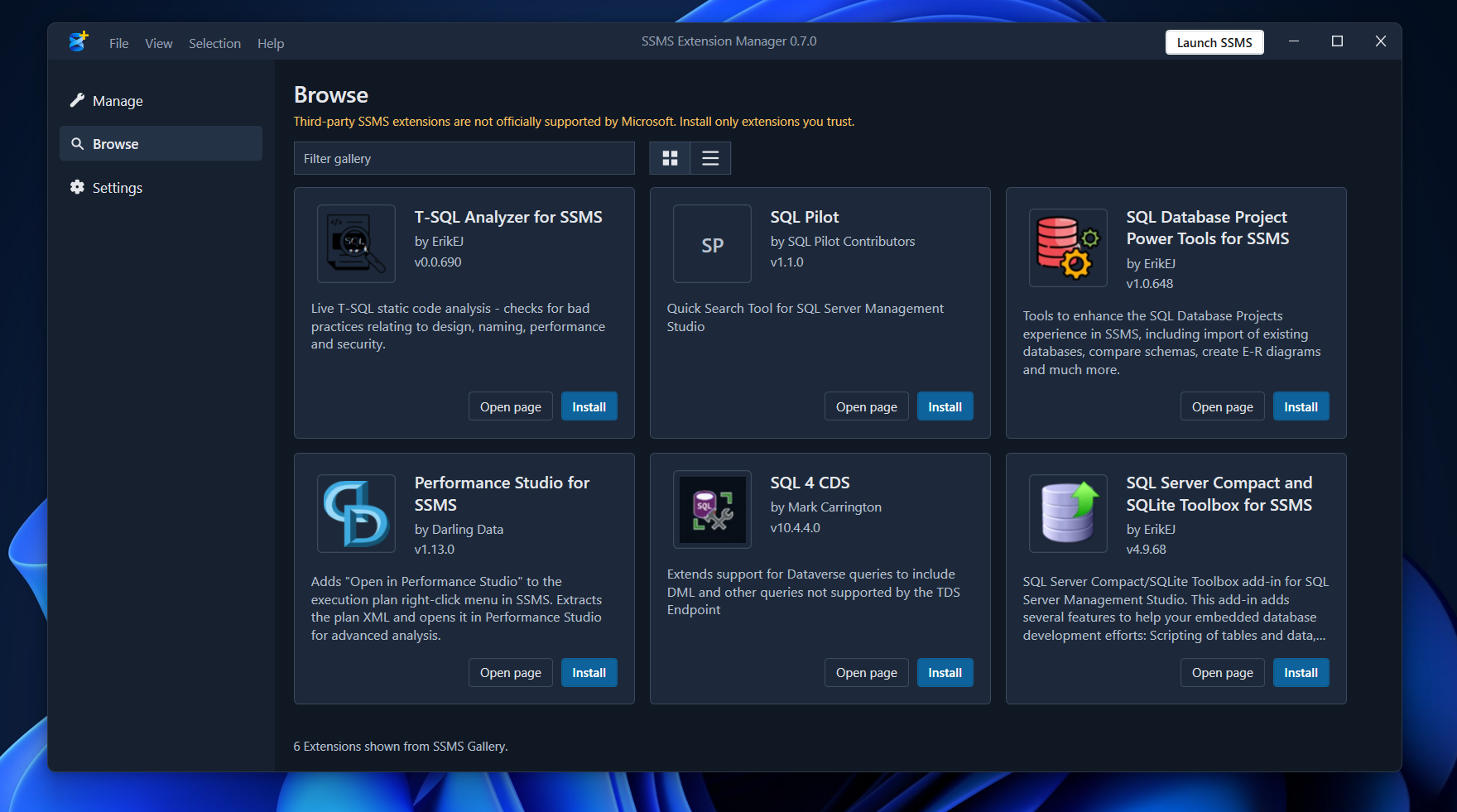
This is where a great community contribution comes in — Blake-goofy's SSMS Extension Manager:
A standalone, open source C# WPF app for managing third-party SSMS 22+ VSIX extensions. With it you can:
- See all installed third-party extensions in one view.
- Check for updates and install them with a click.
- Browse and install new extensions directly from the SSMS Gallery feed.
- Uninstall extensions cleanly when you no longer need them.
It effectively gives SSMS the "Manage Extensions" experience the community has been asking for. Go grab it from the releases page, give the repository a ⭐, and file issues with your feedback.
The full circle
Put the three together and the workflow looks like this:
- Discover an extension on the SSMS Extensions list.
- Download it from the SSMS Gallery (or install it directly via the Extension Manager).
- Maintain it with the SSMS Extension Manager — update notifications, one-click updates and clean uninstalls.
None of this would have happened without the community: Daniel Brink's original extension catalog, Mads Kristensen's Open VSIX Gallery code base, Blake-goofy's Extension Manager, and every author who has published an extension so far. Thank you all! 🎉
If you are an SSMS extension author — or thinking about becoming one — now is a great time to jump in. Publish to the gallery, get listed, and let your users keep themselves up to date.
Comments and feedback are welcome, as always.